How to Endorse a Check: Step-by-Step Guide
Key Takeaways
- •Endorsing a check means signing the back so the bank can process it—usually required to cash or deposit
- •A restrictive endorsement (e.g., “For deposit only”) limits how the check can be used and is safer than a blank endorsement
- •For mobile deposit, sign the back and often write “For mobile deposit only” plus your account number if your bank requires it
- •The name you sign should match how the payee line is written, or use a special endorsement if your legal name differs
- •Never endorse a check until you’re ready to deposit or cash it—endorsed checks are easier for someone else to steal
How to Endorse a Check: Step-by-Step Guide
Endorsing a check means you sign the back of the check to authorize your bank to process it. Without a proper endorsement, the bank usually won’t cash or deposit the funds. This guide explains where to sign, which type of endorsement to use, and how mobile and third-party deposits work.
What Does It Mean to Endorse a Check?
When someone writes a check to you, the front of the check names you as the payee. By endorsing the check on the back, you confirm that you’re transferring or claiming that payment. The bank uses your endorsement to verify you’re allowed to deposit or cash the check.
You’ll endorse in different ways depending on whether you:
- Deposit into your own account
- Cash the check
- Deposit using your phone (mobile deposit)
- Sign the check over to someone else (third-party endorsement)
Where Do You Endorse a Check?
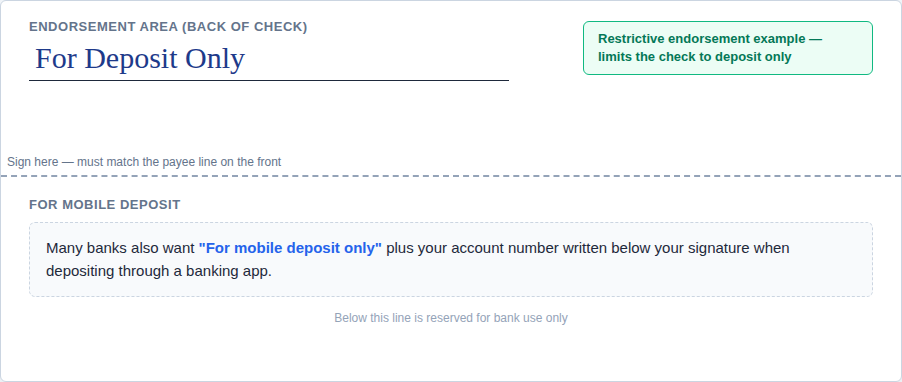
Turn the check over. You’ll see a narrow band (often gray or lightly printed) on one end—sometimes labeled with arrows or text like “Endorse here.” That’s the endorsement area. Sign only in that area so machines and tellers can read your endorsement clearly.
Don’t write on the front of the check except as the issuer when you’re the one writing it. Endorsement always happens on the back for the payee.
How to Endorse a Check: Step by Step
Step 1: Wait Until You’re Ready to Deposit or Cash
Don’t endorse checks in advance. An endorsed check is like cash—if you lose it, someone else might be able to deposit it. Endorse when you’re at the bank, using the ATM, or actively completing a mobile deposit in your app.
Step 2: Match the Payee Name (or Use a Special Endorsement)
Sign the back using the same name that appears on the “Pay to the order of” line.
- If the check is made out to Jane Doe, sign Jane Doe.
- If it’s made out to your business name, sign as the business and bring documentation if your bank requires it for business accounts.
- If the name is misspelled or is a maiden vs married name, ask your bank what they accept. Many banks allow you to sign as printed and sign your legal name, or use a “payable to” correction process—policies vary.
Step 3: Choose the Right Type of Endorsement
Blank endorsement (less secure)
Sign your name only on the back. This is a blank endorsement. The check becomes negotiable—in theory, anyone holding it could try to cash it. Only use this if you’ll cash or deposit immediately in person.
Restrictive endorsement (recommended for deposits)
For extra safety when depositing, add words that restrict what can be done with the check. Common wording:
- For deposit only
- For deposit only to account ending in XXXX (if your bank suggests including account info)
Then sign below or beside that line. Example:
For deposit only
Jane Doe
This tells the bank the funds should go into an account—not be cashed out to a random bearer.
For mobile deposit only
Many banks require you to write For mobile deposit only (or similar language they specify) on the back, in addition to your signature, when you use the mobile app. Some also ask for the date or account number. Always follow your bank’s exact instructions in the app—requirements differ.
Example (illustrative—use your bank’s exact wording):
For mobile deposit only
Jane Doe
Step 4: Sign Clearly
Use a pen (blue or black). Sign consistently with how you sign other documents your bank has on file. Illegible or mismatched signatures can delay processing.
Step 5: Complete Mobile Deposit in the App Before Discarding
After you photograph the check in your banking app, your bank may ask you to keep the check for a period (e.g., 7–14 days) in case of verification. Don’t throw it away until the deposit has cleared and your bank’s retention period has passed—then destroy it if instructed.
Third-Party Endorsement (Signing Over a Check)
If you want to give the check to someone else—for example, pay a contractor with a check that was written to you—you may use a third-party endorsement (also called signing over or endorsing over).
Typical format:
Pay to the order of [Full Name of Next Person]
[Your Signature]
Not all banks accept third-party checks. Many require the second person to have an account at that bank, or they may refuse altogether. Confirm with both banks involved before relying on this method.
Business and Payroll Checks
If you’re depositing a business check into a business account, endorse with the business name as required by your bank, and have an authorized signer sign. Rules for sole proprietorships vs LLCs vs corporations vary—your bank can tell you the exact format.
Common Mistakes to Avoid
- Endorsing too early – Increases risk if the check is lost or stolen.
- Signing in the wrong place – Stay within the endorsement zone on the back.
- Wrong name – Mismatch between payee line and signature can cause rejection.
- Missing mobile deposit wording – Can cause the deposit to be rejected; follow the app.
- Double deposit – Don’t deposit the same check physically and via mobile; that’s fraud and will bounce.
- Using pencil – Use pen for a permanent endorsement.
How Endorsement Connects to Writing a Check
If you’re the payer, you fill out the front of the check (see our how to write a check guide). The payee endorses the back when they receive it. If you use a check writer to print checks, the payee still endorses the physical check the same way when they deposit it.
Frequently Asked Questions
Do I always have to endorse a check to deposit it?
Almost always yes for personal accounts. Some ATMs and teller practices may vary for certain official checks; when in doubt, endorse unless your bank tells you otherwise.
Can I deposit a check without endorsing it?
Usually no. Exceptions are rare and institution-specific (e.g., some remote deposit workflows for businesses). Personal depositors should plan to endorse.
What’s the safest way to endorse?
Use a restrictive endorsement (“For deposit only”) plus your signature when depositing into your account. For mobile, add whatever your bank requires (e.g., “For mobile deposit only”).
Can I endorse a check to myself?
If the check is payable to you, you endorse and deposit into your own account—that’s normal. If you mean moving money between banks, you might also write a check to yourself from another account—see our guide on how to write a check.
What if I mess up the endorsement?
Don’t scribble over it in a way that looks like tampering. Ask your bank whether you need a replacement check from the issuer or whether they’ll accept a corrected endorsement on the back.
Summary
Endorse a check by signing the back in the designated area, using the payee name from the front, and—when depositing—adding a restrictive endorsement like “For deposit only.” For mobile deposit, follow your bank’s wording and keep the check until the deposit clears. Wait to endorse until you’re ready to deposit or cash to reduce fraud risk.
Need to create or print a check? Use our free check writer and browse check templates.