Voided Check for Direct Deposit — Free PDF
Need to print a check? Fill one in with our free check writer — pick a template, add your details and download a print-ready PDF. No signup.
Key Takeaways
- •Employers and banks often need a voided check to set up direct deposit
- •A voided check is a normal check with 'VOID' written on it so it can't be cashed
- •You can create one free: use a check template, add your details, print, then write VOID
- •Our free check writer lets you generate a check with your routing and account number—no signup
- •Submit the voided check (or a clear photo) to your employer or bank to set up direct deposit
Setting up direct deposit usually means your employer or bank asks for a voided check. If you don’t have one handy, you can create a free printable check with your routing and account numbers, then void it yourself. This guide explains what a voided check is, why it’s needed for direct deposit, and how to get one using a free check template—no signup required.
What Is a Voided Check?
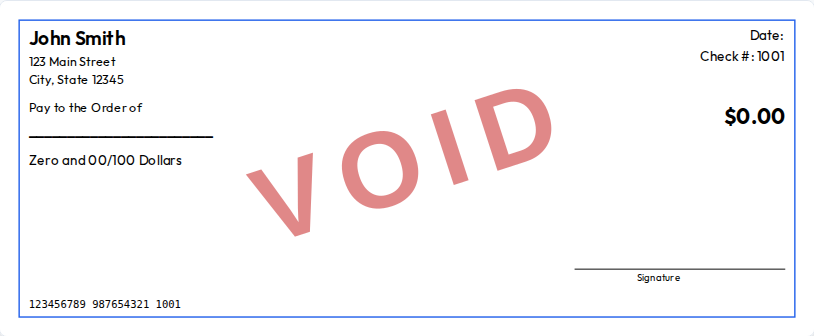
A voided check is a normal check that has the word VOID written on it (often in large letters across the front) so it cannot be used for payment. It’s not cashed or deposited; it’s only used to show your bank’s routing number and your account number. Employers and banks use that information to set up direct deposit or automatic payments.
Why Do You Need a Voided Check for Direct Deposit?
When you sign up for direct deposit, your employer (or the government, for benefits) needs to know where to send the money. They need:
- Routing number – Identifies your bank (9 digits).
- Account number – Identifies your specific checking account.
A voided check has both numbers printed on it in standard form (usually at the bottom in the MICR line), so it’s an easy, reliable way to provide that information. Many employers and banks accept a clear photo or scan of a voided check instead of the physical check.
How to Get a Voided Check for Direct Deposit (Free)
You have a few options:
- Use an existing check – Take a real check from your checkbook, write VOID across it in large letters, and submit it or a photo. If you don’t have checks, use option 2 or 3.
- Request a voided check from your bank – Some banks provide a “direct deposit form” or a voided check on request (in branch or via online banking). This can take a few days.
- Create one with a free check template – Use a free check writer or check template to generate a check with your routing and account numbers, print it, write VOID on it, and submit. This is the fastest option if you don’t have checks and don’t want to wait for the bank.
Below is the step-by-step for option 3.
Step-by-Step: Create a Voided Check with a Free Template
Step 1: Open a free check writer
Go to a free check writer in your browser. CheckWriter works without signup: open the app, and you’ll see a form where you enter your details and a live preview of the check.
Step 2: Enter your bank and account information
Fill in:
- Your name and address (as they appear on your account).
- Bank name (optional but helpful).
- Routing number (9 digits – find it on your bank’s website, app, or a statement).
- Account number (your checking account number).
- Check number (e.g. 0001 for a one-off voided check).
Leave Pay to the order of and Amount blank or set amount to $0.00. You’re not paying anyone; you’re only creating a check to show your routing and account numbers.
Step 3: Download the check as PDF
Click Download to get a PDF of the check. Open the PDF and confirm your name, routing number, and account number are correct and readable (especially the numbers at the bottom).
Step 4: Print the check
Print the check on plain paper or blank check stock. For direct deposit, plain paper is usually fine since you’re only providing information, not cashing the check. If your employer asks for a “real” check, use blank check stock.
Step 5: Write VOID on the check
Using a pen, write VOID in large letters across the front of the check (e.g. diagonally or across the payee/amount area). This makes it clear the check cannot be used for payment.
Step 6: Submit to your employer or bank
Give your employer or bank the voided check (or a clear photo or scan). They’ll use the routing and account numbers to set up your direct deposit. Once set up, your pay or benefits will go straight to your checking account.
Free Check Template for Voided Checks
You don’t need a special “voided check template.” Any free check template that lets you enter your routing and account number will work. Use a blank check template or personal check template, add your details, and leave the payee and amount blank or zero. After printing, write VOID on it.
Create a voided check now →
Browse check templates →
What If My Employer Asks for Something Else?
Some employers accept:
- Direct deposit form from your bank (download from online banking).
- Bank letter with routing and account number.
- Voided check (what we covered above).
If they specifically ask for a “voided check,” the method above—creating a check with your details, printing it, and writing VOID on it—is the standard approach. When in doubt, ask your HR or payroll department.
Frequently Asked Questions
Can I use a voided check from a check generator?
Yes. A voided check from a free check writer or check template that shows your correct routing and account numbers is acceptable for direct deposit setup in most cases. The employer or bank only needs to read those numbers; they don’t cash the check.
Do I need to use special paper?
For direct deposit, many employers and banks accept a voided check printed on plain paper, or even a clear photo of it. If they require a check on “check stock,” you can print the template on blank check stock (available at office supply stores or online) and then void it.
Where do I find my routing and account number?
Check your bank’s website (often under “Account details” or “Direct deposit”), your mobile app, or a paper or PDF statement. The routing number is 9 digits; the account number is usually listed next to it. Don’t use a number from an old or closed account.
Is it safe to give a voided check?
A voided check cannot be cashed. You’re only sharing your routing and account number so money can be deposited into your account. Give voided checks or photos only to your employer or a trusted institution (e.g. your bank or a government benefits office). Don’t post them publicly.
Ready to create your voided check?
Use our free check writer to create a check with your routing and account number, print it, write VOID on it, and submit it for direct deposit—no signup required.